Guide
How to withdraw from Binance and where to move your funds: guide for EU customers
Binance has no MiCA license and closes the accounts of its EU customers on December 31, 2026. Here is how to withdraw your crypto and euros, the three dates that decide the fee, and where you can move your funds.
How do I withdraw money from Binance? Withdraw your crypto and any euro balance from your account, and do it by Sunday, November 29, 2026 (23:59 UTC). Then you pay no fee, and Binance closes the account on December 31 anyway. This guide is based on the email Binance sent to its users on November 6, 2026. Users in France, Spain and Italy received similar notices, so check the dates and fees in your own account.
In short: Binance closes the accounts of its EU customers effective December 31, 2026. Withdraw everything by November 29 (23:59 UTC) and you pay nothing. Leave funds and you pay 0.025% of the balance or 10 USDC per month (whichever is higher), calculated on November 29 and December 24. Binance may convert, transfer or otherwise deal with any funds left after December 31.
What happened? Binance is closing accounts in the EU
Binance did not get a MiCA license by June 30, 2026, so it is winding down its services for EU customers and will close their accounts on December 31. The information comes from an email to users dated November 6, 2026. In it, Binance also says it is still seeking MiCA authorization and will report on progress.
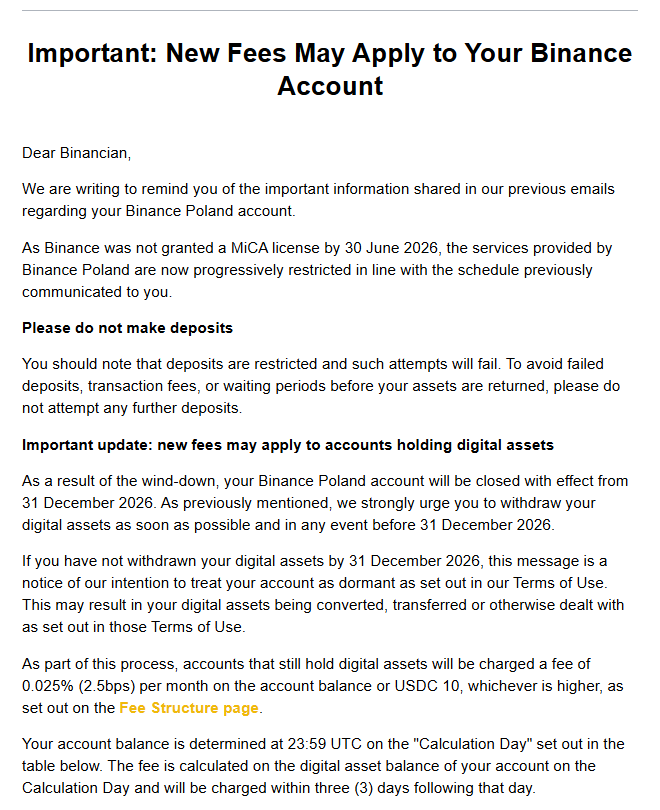 The email Binance sent on November 6, 2026, English version (excerpt).
Services had been restricted step by step before that. The timeline from the email:
| Date | What happens |
|---|---|
| Jun 30, 2026 | Binance has no MiCA license. At 09:00 UTC P2P stops |
| Jul 1, 2026 | No new Spot or Convert orders (selling for EUR and USDC remains), no new Earn subscriptions, no Binance Pay transfers. Deposits blocked |
| Oct 1, 2026 | Margin positions closed, loans settled, API permissions for repayments revoked |
| Nov 6, 2026 | Email about account closures and new fees |
| Nov 29, 2026 | First fee calculation date |
| Dec 24, 2026 | Second fee calculation date |
| Dec 31, 2026 | Accounts closed |
According to a November 8 report by crypto.news, users in France, Spain and Italy received similar notices. The French outlet Cryptoast had reported the same message two days earlier. The email does not say who decided the wind-down, so we do not speculate. The earlier background, including the Greek application withdrawn on June 24, is on our page Does Binance have a MiCA license?.
Where can I withdraw my money from Binance?
You can withdraw your funds from Binance to any exchange with a MiCA license. We checked which EU exchange is receiving the most funds from Binance right now and which exchange currently has the best offer for new customers (November 2026). In both cases, it is OKX Europe. The reasons:
- OKX Europe Limited holds a MiCA (CASP) license from Malta’s regulator MFSA. It has been in the ESMA register since January 27, 2025 and can serve clients in all 30 EEA countries (per the ESMA register). Details in the OKX profile.
- Until December 10, 2026, OKX adds a bonus it calls “8% APR” on crypto deposited on-chain from another exchange or wallet, Binance included. In practice that is 2% of the deposit, capped at 850 EUR. The terms are below, because the bonus has fine print.
How do I get the 8% APR bonus for moving crypto from Binance to OKX?
Opt in to the campaign at OKX first, then deposit any cryptocurrency on-chain (from Binance, another exchange or a wallet) between November 10 and December 10, 2026. OKX calls the bonus “8% APR”, but the terms spell it out: it is a fixed 2% of your deposit, and 8% is that same amount expressed as an annual rate. The bonus is not paid all at once: OKX pays it in seven installments until March 2027. The terms according to the OKX campaign page (read on November 10, 2026):
-
An OKX Europe account with identity verification (KYC). It must be a main account, sub-accounts cannot take part. The campaign page says the offer is for users in France, Italy, Spain, Sweden, Poland and Belgium. The terms add that the campaign is for selected users and that living in an eligible country does not by itself guarantee access, so check that you can see it in your account.
-
Opt in before you deposit. Open the campaign page “Deposit any crypto and get 8% APR” and click the “Join Now” button (green arrow in the screenshot below). The terms call this step “Opt-in” and say to make sure the button shows “Deposit now” once you have joined. Deposits made before you opt in and balances you already hold at OKX do not count.
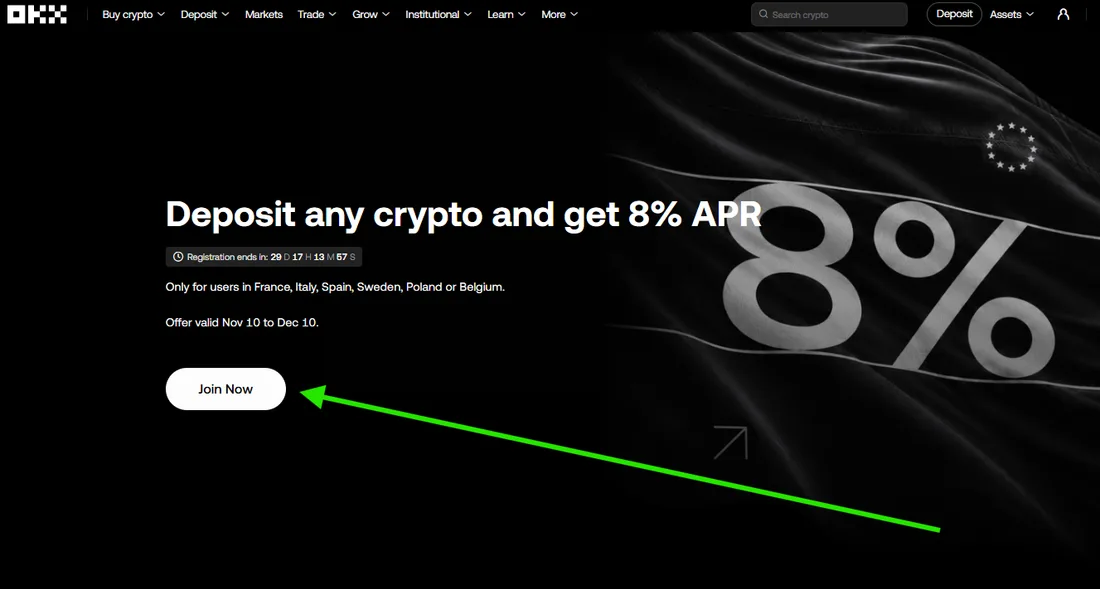 Step 2: the Join Now button on the OKX campaign page (English interface, screenshot taken November 10, 2026).
-
Deposit crypto on-chain from an external wallet or another exchange, for example from Binance. Every cryptocurrency OKX accepts as an on-chain deposit counts, so you do not need USDT, and the steps do not ask you to convert anything (the previous campaign required converting USDT to USDC). The minimum is the equivalent of 10 EUR.
-
Make sure the deposit is credited by December 10. What counts is a deposit credited to your main OKX account during the campaign, not the moment you place the withdrawal at Binance. The campaign page shows only a registration countdown (screenshot above): on the afternoon of November 10 it read 29 days and 17 hours, which by our calculation puts the end on December 10 before noon CET, not at midnight. Do not leave it to the last day. Leaving Binance by November 29 pays off anyway, because it avoids the fee there.
-
Keep the deposited funds at OKX until March 11, 2027. You can trade with them, but every withdrawal and every transfer out of the account reduces the amount the bonus is calculated on.
How much do you get?
- 2% of the deposit, presented as 8% APR. The terms set a fixed 2% on eligible deposits and state that the 8% annual rate is only that amount converted over the roughly three-month payout period (simple interest, not compounded).
- Cap: deposits up to the equivalent of 42,500 EUR, so at most 850 EUR of bonus, paid in USDC. Anything above the cap earns nothing extra.
- Seven installments about two weeks apart, from December 17, 2026 to March 11, 2027, each 1/7 of the bonus. On a deposit worth 1,000 EUR that is 20 EUR, about 2.86 EUR per installment. On 10,000 EUR it is 200 EUR, about 28.57 EUR per installment (our calculations).
- Condition: do not withdraw the deposited funds before March 11, 2027. OKX also treats as a withdrawal a transfer to another OKX user, to another exchange, to OKX Wallet, to a DEX, to an external wallet or to an OKX Pay account, and even withdrawing the reward itself. If your balance falls below the required amount, you lose that installment unless you top up the shortfall before the payout date.
- Trading is allowed. According to the campaign page, trading losses and price swings do not reduce the payout. Only withdrawals and transfers out of the account do.
- What counts and what does not. New on-chain crypto deposits credited to your main account after you opt in count. EUR and other cash deposits, deposits by SEPA or card, crypto bought by SEPA, card, Apple Pay or Google Pay, internal transfers and trades through OKX CeDeFi do not.
- OKX sets the euro value. OKX works out the EUR equivalent of your deposit and the USDC amount of each installment with its own valuation method at the time of calculation. The page does not say which rate it uses.
- OKX may change, extend or end the campaign. The previous campaign (8% on USDT converted to USDC) was due to run until November 13, and OKX closed it on November 10 (information from OKX). The terms also say that only the last campaign you opted in to is rewarded, and they do not explain what happens to installments from an earlier one. If you took part in the previous campaign, ask OKX before you opt in to the new one. Read the full terms on the campaign page.
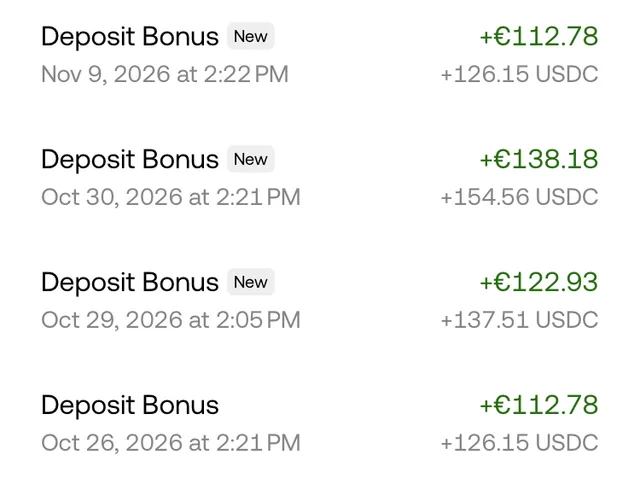 Deposit bonus installments from earlier OKX campaigns, paid in USDC between October 26 and November 9, 2026 (app in English, screenshot cropped to the list of payouts). In the new campaign the first installment is due on December 17.
What this changes for Binance users: the previous campaign applied only to USDT, which you can no longer buy on Binance. The new one covers any cryptocurrency deposited on-chain, so you can move what you hold without selling or converting it. The terms do not exclude stablecoins, so in our reading USDC counts too, and Binance still lets you sell crypto for USDC through Convert. The catch is a different one: the route through your bank earns no bonus. If you sell crypto for EUR on Binance, withdraw the money to your bank account and deposit it at OKX by SEPA transfer, that deposit does not count. The page names no excluded cryptocurrencies or networks, so before you send, check that your cryptocurrency and network appear on the OKX deposit screen, then choose the same network in the withdrawal step at Binance.
What does this mean for your funds?
Your funds do not disappear, but you have until December 31 to move them and you pay for every month of delay. Binance assures users in the email that assets are safe and available and that withdrawing crypto and funds in EUR keeps working without a sudden block. That is Binance’s statement, not our verification.
What changes in practice:
- Deposits do not work. Do not retry them, because Binance warns of failed deposits, transaction fees and a waiting period for a refund.
- Selling and withdrawing still work. Trading is switched off, but Convert still lets you sell crypto for EUR or USDC.
- After December 31, the account is classified as “inactive.” The funds may be converted, transferred or otherwise dealt with under the Terms of Use. The email names neither the currency, nor the destination, nor the rate.
- Some products do not unwind with one click. Simple Earn Locked products (lock-ups of up to 180 days) return funds only when the lock-up ends. ETH and SOL staking and other Earn products can take more than a few days to return to your Spot wallet, according to Binance. Cloud Mining and On-Chain Yield return funds at the end of the period. If you hold such products, check now when the funds will come back, because they may not be available before November 29.
- The controller of your personal data may change. Binance promises a separate notice before that happens.
On the account we used for the screenshots, opening the Earn tab shows a window saying these features are not available in that region. That account had no Earn products, so the screenshot does not show how to redeem an existing subscription. If you have funds there and Binance does not let you into the tab, use the Support button in that window.
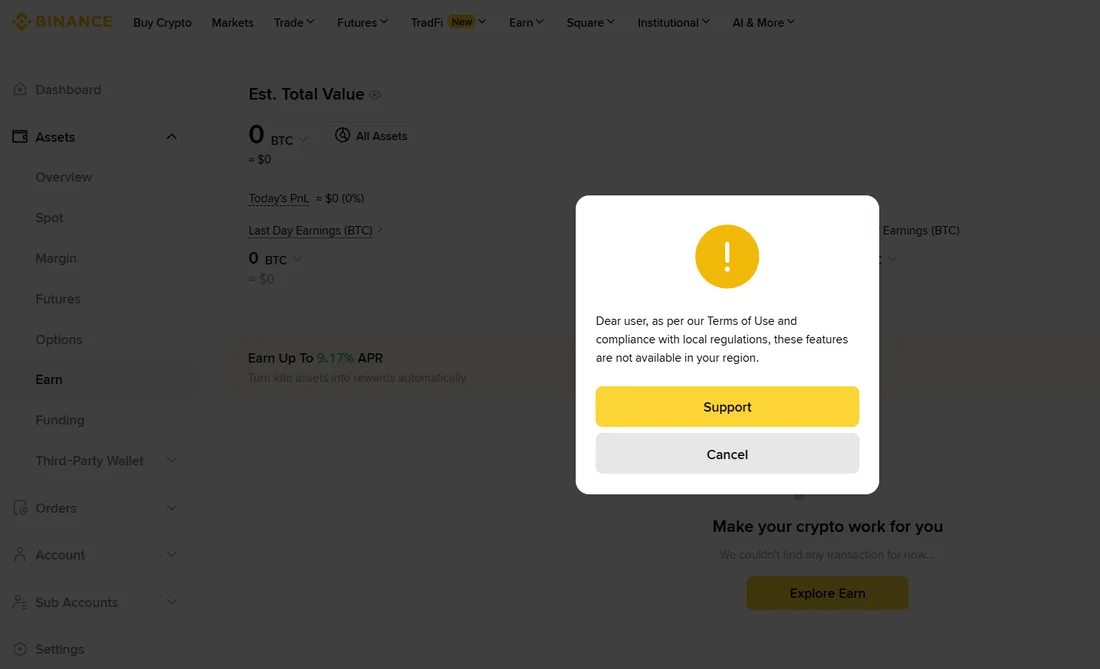 The Earn tab on an account without Earn products: a window saying the features are not available in the region (English interface, screenshot taken November 9, 2026).
What will you pay if you leave your funds on the account?
You pay 0.025% of the balance per month or 10 USDC, whichever is higher. Binance checks the balance at 23:59 UTC on the calculation date and charges the fee within three days after it.
- November 29, 2026 (Sunday), at 23:59 UTC, which is 00:59 CET on Monday, November 30.
- December 24, 2026 (Thursday), at 23:59 UTC, which is 00:59 CET on Friday, December 25.
| Balance on the calculation date | Fee | Share of the balance |
|---|---|---|
| 5 USDC | 5 USDC (the whole balance) | 100% |
| 50 USDC | 10 USDC | 20% |
| 100 USDC | 10 USDC | 10% |
| 1,000 USDC | 10 USDC | 1% |
| 10,000 USDC | 10 USDC | 0.1% |
| 40,000 USDC | 10 USDC | 0.025% |
| 100,000 USDC | 25 USDC | 0.025% |
So the 10 USDC minimum applies up to 40,000 USDC, and the percentage fee only becomes the higher amount above that. The examples with 5, 100 and 100,000 USDC come from Binance itself in the email. The other rows are our calculations from the formula.
- How Binance collects the fee. First from the USDC on the account. If there is not enough, from other crypto, at its USDC equivalent at the market rate on the calculation date.
- If the balance is lower than the fee, Binance takes the whole balance.
- If you withdraw everything before the calculation date, no fee is charged. Leaving funds until December 24 means two fees, and withdrawing between November 29 and December 24 means one.
What should you do now? Action plan until November 29
Withdraw everything with time to spare, ideally by Friday, November 27, because November 29 is a Sunday. That advice is ours, not Binance’s: a weekend can slow a transfer, and the calculation date does not wait for your SMS code.
- Check that the email is genuine. Binance never calls and never asks for a password, 2FA codes or private keys. Log in through the app or by typing the address yourself and check the closure information there, never through a link in the message. With a wave of notices like this, scammers pose as the exchange.
- Take stock of the account. Look at the Spot and Funding wallets, Earn and staking products, loans and open P2P disputes (these stay accessible until resolved).
- Start redeeming locked products. Staking, Cloud Mining and Simple Earn Locked return funds with a delay. The sooner you check the dates, the less will be left on the account on the calculation date.
- Download your transaction history before the account is closed. That is our advice, not from the email: the account disappears and you will need the history for your tax return. The withdrawal itself is not a sale, but selling crypto for fiat currency can have tax consequences. This is general information, not tax advice.
- Choose the destination. An exchange with a MiCA license or your own wallet. Details in the section below.
- Send a test amount and check that it arrived.
- Withdraw the rest. Do not leave small leftover amounts (dust), because below 10 USDC Binance will take the whole balance anyway.
- Close the account or leave it empty. You can do this at any time after withdrawing the funds to your chosen wallet or provider.
How do I withdraw from Binance? Step by step
You have two routes: send crypto to another exchange or your own wallet, or sell it and withdraw the money to a bank account. The screenshots come from Binance’s English interface in the web version, so we give the button names in English. In another interface language they may be called something else.
Withdraw crypto to a licensed exchange or your own wallet
-
Copy the deposit address at the destination (at the licensed exchange or in the wallet) and note which network it is for, for example TRC20, ERC20 or BNB Smart Chain for USDT.
-
Open the withdrawal screen at Binance. In Assets, on the Overview page, click the Withdraw button (arrow 2 in the screenshot). The wallet icon in the top right corner (arrow 1) leads to the same place.
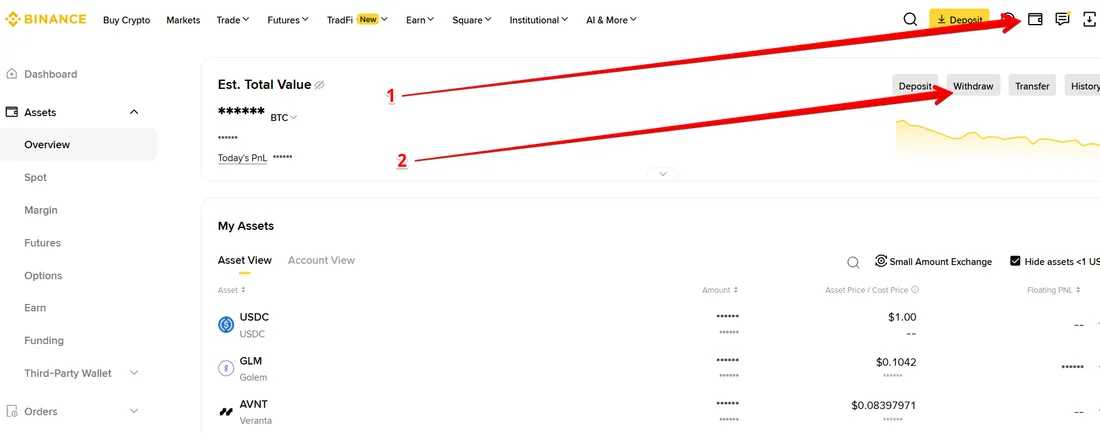 Steps 1 and 2: the wallet icon in the top right corner and the Withdraw button in the Assets, Overview view (screenshot taken November 9, 2026).
-
Choose the cryptocurrency and paste the address. In the menu on the left, Withdraw Asset is already selected. In the Select Asset step pick the cryptocurrency (USDC in the screenshot), in the Withdraw to step keep the Address tab and paste the address. The Binance user tab is for transfers to other Binance users, not to another exchange.
-
Choose the same network the recipient specifies. In the screenshot it is ETH Ethereum (ERC20). Sending on the wrong network is the most common cause of permanent loss of funds. For some assets (for example XRP) a Memo or Tag is also required.
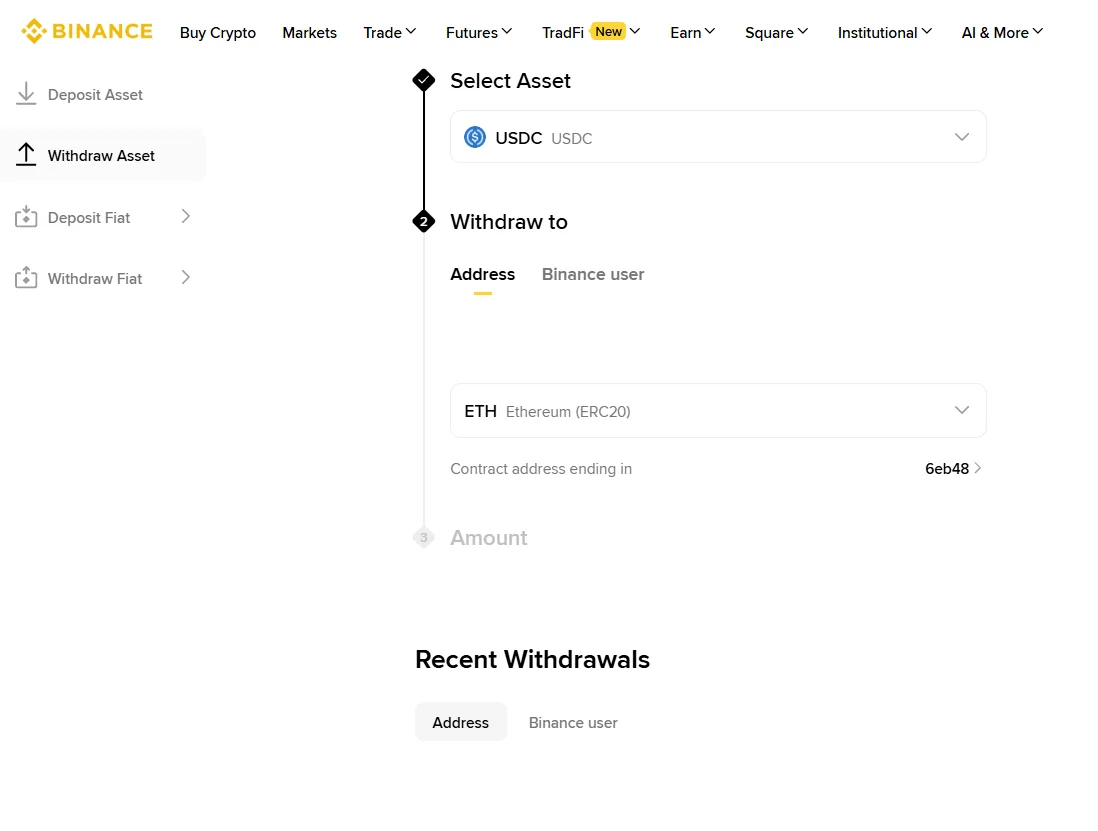 Steps 3 and 4: the Withdraw Asset screen with the choice of cryptocurrency, address and network (screenshot taken November 9, 2026).
-
Start with a small test amount in the Amount step and send the rest only once it has arrived.
-
Confirm the withdrawal with your 2FA code. The network fee and the minimum amount are shown on screen before you confirm. Binance has not said it will waive network fees on withdrawals.
Withdraw money to a bank account
- Sell your crypto through Convert for EUR or USDC. It is the only trading operation available.
- Check in your account which fiat withdrawal options you see. The menu of the withdrawal screen has a Withdraw Fiat entry (visible in the screenshot above), but the screenshot does not show which currencies are available. Binance’s email mentions withdrawing funds in EUR. Before you plan it, check whether a bank transfer is offered for your EUR balance, because it depends on your account’s status.
- Give an account in your own name. The account holder’s name must match the data verified at Binance, otherwise the transfer may be sent back.
- Confirm the withdrawal and check the fee and the amount that will reach the account in the summary.
If a fiat withdrawal is not available, sell your crypto for USDC, withdraw it to an exchange with a MiCA license and convert it to euros there.
Where can I move my funds from Binance?
To an exchange with a MiCA (CASP) license, or to your own wallet. Since July 1, 2026, only companies with such a license may provide crypto-asset services in the EU and EEA. Binance’s email proposes exactly these two options: a self-custody wallet or another authorized provider.
- Check the exchange in the register. The CASP directory shows entries from the ESMA register, which you can verify at the source.
- Compare well-known brands. We collected the license status of the world’s biggest exchanges on the page TOP 100 cryptocurrency exchanges and their MiCA licenses.
- Treat bonuses as a perk. We describe the OKX campaign at the start of this guide. Other offers change often, so the list with end dates is on the bonus comparison page. Always read the terms on each exchange’s own site.
- Your own wallet sidesteps the question of an exchange’s license, but you are responsible for the keys. Decide for yourself whether that suits you.
What don’t we know yet?
- What exactly will happen to the funds after December 31. The email only says they may be converted, transferred or otherwise dealt with.
- Whether the fee will also apply to funds locked in Earn or staking that only come back once the lock-up ends.
- Whether Binance will return with a MiCA license, and in which country. The company states an intention, there is no decision we could confirm.
- Whether Binance will change the dates or terms. We will update this guide if it does, and we change the updated date only when something substantive changes.
Frequently asked questions
Can I withdraw euros from Binance to my bank account?
Binance's email mentions withdrawing crypto and funds in EUR. Selling through Convert is still possible for EUR and USDC. Whether your account offers a withdrawal to a bank account depends on your account's status. Check it in your account before you plan a transfer.
By when do I have to withdraw my funds from Binance?
Binance will close your account effective December 31, 2026. To pay no fee at all, withdraw everything by 23:59 UTC on November 29, 2026 (00:59 CET on November 30).
How much does it cost to leave crypto on Binance after November 29?
Binance charges 0.025% of the balance per month or 10 USDC, whichever is higher. For a balance below 40,000 USDC the 10 USDC minimum therefore applies. The fee is calculated twice, based on your balance on November 29 and again on December 24.
What happens to funds I do not withdraw by December 31?
Binance says it will treat the account as inactive under its Terms of Use. The funds may be converted, transferred or otherwise dealt with. The email does not say into which currency, where to or at what rate.
Can I still deposit funds into Binance?
No. Deposits have been blocked since July 1, 2026 and attempts fail. Binance asks users not to repeat them, because they can lead to transaction fees and a waiting period for a refund.
Do I have to close my Binance account myself?
No, Binance closes the accounts effective December 31, 2026. If you do not want to wait until then, you can close the account yourself once you have withdrawn all your funds. That is our own assessment, not information from the email.
Which EU countries is Binance closing accounts in?
It affects all residents of the European Union. Binance did not obtain a MiCA license, and without one it may not provide crypto-asset services in the EU.
Will Binance come back with a MiCA license?
Binance says it is aiming for MiCA authorization and will report on progress, but we cannot confirm a new application or a decision. A license is only real once the entity is listed in the ESMA register.


